
Blog Topics:
FedEx Global Trade Navigator: How Monroe Shippers Can Estimate Duties Before They Ship
FedEx Global Trade Navigator: How Monroe Shippers Can Estimate Duties Before They Ship
On September 9, 2026, FedEx introduced Global Trade Navigator — a suite of digital tools that includes a free Trade Planner for looking up HS codes and estimated duties before you create a shipping label.
Quick answer: FedEx’s new Global Trade Navigator (announced September 9, 2026, Memphis) is a suite of digital tools built to move trade information earlier in the shipping journey. The piece Monroe walk-in shippers will feel first is FedEx Trade Planner: free, self-service on fedex.com, no login required. You can look up Harmonized System (HS) codes; get estimated duties, taxes, and fees; and see document recommendations before you create a label. Those numbers are planning estimates — not a guaranteed duty bill. Destination customs (and, for inbound US packages, CBP) can still assess differently. This post is about the planning tool. It is not a redo of our US tariffs / de minimis update or the Sep 21 FedEx international Demand Non-standard fee calendar.
A Monroe customer walked in last month with a gift box headed to family overseas. The base international rate looked fine. The recipient called two weeks later about an unexpected duty bill at the door. That story is exactly what FedEx’s 2026 Small Business Trade Index is measuring: 68% of small- and medium-sized businesses regularly see customers surprised by duties at delivery, and 60% report losing revenue through refunds or abandoned purchases (FedEx newsroom, Sep 9, 2026).
Global Trade Navigator is FedEx’s answer to moving that conversation earlier — before the label, before checkout friction, and before clearance becomes a crisis. For people shipping from Monroe through a FedEx Authorized ShipCenter (or comparing DHL Express at a DHL Service Point under the same roof), the practical question is simple: what can you look up for free before you tape the carton?
What FedEx Announced on September 9, 2026
Per FedEx’s official newsroom release (Memphis, September 9, 2026, 09:01 AM):
“International shipping requires businesses to make complex decisions long before a package begins its journey,” said Jason Brenner, senior vice president, digital portfolio, FedEx. “Building on decades of global trade expertise, Global Trade Navigator makes critical trade information and guidance more accessible to businesses as they grow internationally. The result is fewer surprises and a more predictable experience for businesses and consumers.”
Global Trade Navigator is the suite name. Inside it, FedEx listed five capability areas:
| Piece of the suite | What FedEx says it does | Who it helps most |
|---|---|---|
| FedEx Trade Planner | Free, self-service on fedex.com; no login; HS code lookup; estimated duties/taxes/fees; document recommendations before creating a label | Walk-in / SMB / first-time international shippers |
| FedEx Ship Manager enhancements | Review product HS classifications, customs values, and country-of-manufacture details | Anyone building labels in Ship Manager |
| FedEx Duty and Tax app on Shopify | Duty/tax guarantee visibility at checkout | Online sellers on Shopify |
| Global Trade APIs (Developer Portal) | Integrate classifications, estimated duties/taxes, and regulatory info into existing workflows | Developers / enterprises |
| Import Tool + Reporting enhancements | View clearance activity, required actions, payments, and import/export data | Importers and accounts that already clear with FedEx |
Monroe’s day-to-day counter traffic mostly lives in the first two rows: plan before you ship, then get the shipment data right when the label is built. The Shopify app and APIs matter for e-commerce sellers — we mention them so the suite is complete, not because every gift shipment needs an API key.
What FedEx Trade Planner Actually Is (and Is Not)
It is
- A free planning tool on fedex.com
- Usable without a login, per FedEx’s announcement
- A place to look up Harmonized System / HS codes for products
- A place to see estimated duties, taxes, and fees for a planned shipment
- A source of document recommendations before you create a shipping label
It is not
- A guaranteed final duty invoice from destination customs
- A substitute for accurate commercial invoices and product descriptions
- A rewrite of US de minimis / tariff policy (see our tariffs post)
- A size / Demand fee calculator for odd-shaped international boxes (see Sep 21 Non-standard Demand)
- Legal, brokerage, or tax advice
Hard caveat (read this twice): Trade Planner estimates are estimates. CBP (for US inbound) and destination customs authorities can assess different amounts based on classification, valuation, preferential claims, PGA holds, and local rules. Do not invent a dollar duty figure from a blog post — including this one — and do not treat a planning screen as a locked bill of landing costs.
For official HTS / HS classification reference in the United States, start with the USITC Harmonized Tariff Schedule. Classification mistakes are one of the fastest ways an “estimate” and a real clearance diverge.
Why Duty Surprises Still Happen (Even With Better Tools)
FedEx’s own index numbers explain the pain:
- Customers learn the landed cost at the door. DDU (Delivered Duty Unpaid) shipments put the duty conversation on the recipient. If nobody estimated duties first, the knock on the door feels like a surprise fee — even when the carrier did nothing wrong.
- Refunds and abandoned carts. When online buyers see unexpected import charges after purchase (or refuse delivery), sellers eat refunds, reships, and lost sales. FedEx cites 60% of SMBs losing revenue that way.
- Paperwork lags the box. Vague descriptions (“clothes,” “parts,” “gift”), missing country of manufacture, and soft values create holds. Tools help only if the data you enter is honest and specific.
- Rules move. Destination VAT/GST thresholds, US inbound entry changes, and carrier accessorial calendars change on different clocks. A planning tool reduces surprise; it does not freeze global trade law.
That is why FedEx framed Global Trade Navigator as moving intelligence earlier — planning, shipment prep, checkout, and reporting — instead of only at clearance.
How Monroe Shippers Should Use Trade Planner Before a Label
Think of this as a pre-counter checklist. You can run Trade Planner at home on fedex.com, then bring the notes (and the unsealed carton) to a FedEx Authorized ShipCenter when you are ready to ship.
Step 1 — Name what is actually in the box
Write a plain-language list:
- Exact item type (not “misc”)
- Material / composition when it matters (e.g., cotton shirt vs polyester)
- Quantity and unit value
- Country of manufacture
- Whether it is a commercial sale, a personal gift, or documents
If you cannot describe it clearly to a human at the counter, the HS lookup will be guesswork.
Step 2 — Look up the HS / HTS family
Use FedEx Trade Planner’s HS lookup, and cross-check sensitive classifications against hts.usitc.gov when the product sits near a tariff line that changes the duty story. Close-but-wrong codes are worse than admitting you need help.
Step 3 — Run the estimated duties / taxes / fees view
Enter destination, values, and classification as accurately as you can. Screenshot or write down:
- Estimated duty / tax / fee totals shown
- Any document recommendations the tool lists
- Assumptions the tool displays (currency, Incoterms hints, etc.)
Then say out loud: “This is an estimate.” Tell your recipient the same thing if they will pay on delivery.
Step 4 — Decide DDU vs DDP with eyes open
| Option | Who pays import charges | When it helps |
|---|---|---|
| DDU (duty unpaid) | Recipient | Personal gifts when the recipient expects and can pay |
| DDP (duty paid) | Sender arranges upfront (when the lane/service supports it) | Repeat commercial buyers who hate doorstep surprises |
Trade Planner does not magically pick DDU vs DDP for you. It gives you a planning number so the conversation is not a coin flip.
Step 5 — Build the label with matching data
When you create the FedEx label — at home in Ship Manager or at the counter — the commercial invoice should match what you planned:
- Same HS / classification story
- Same declared values
- Same country of manufacture
- Specific descriptions
FedEx’s Ship Manager enhancements under Global Trade Navigator are aimed at reviewing those fields before the shipment leaves. Use that review. Do not paste a pretty estimate into a vague invoice.
Step 6 — Separate duty planning from carton geometry
Duty estimates do not protect you from Additional Handling / Oversize / Unauthorized Demand on international packages starting Sep 21, 2026. Measure the outer carton. Right-size the box. Quote with dimensions. Two different failure modes; both can hit the same shipment.
What Else Is in Global Trade Navigator (Briefly)
Ship Manager classification / value / origin review
If you ship often enough to live in FedEx Ship Manager, the new review capabilities for HS codes, customs values, and country of manufacture are the “don’t ship on autopilot” layer. Catching a wrong origin country before the label prints is cheaper than arguing with clearance later.
Shopify Duty and Tax app
For Monroe e-commerce sellers on Shopify, FedEx’s Duty and Tax app is designed to show a duty/tax guarantee at checkout so buyers see import costs before they buy. That is a different audience than a one-off gift at the counter — but it is the same duty-surprise problem FedEx’s index measured.
Global Trade APIs
Enterprises can pull classifications and estimated duties into their own systems via the FedEx Developer Portal. Most Highway 2 corridor walk-ins will never open that portal. Sellers with custom checkout stacks might.
Import Tool and Reporting
If you import into the United States with FedEx, clearance activity views and reporting enhancements matter more than outbound gift planning. Keep inbound US rule changes (de minimis suspension, Entry Type 13, postal informal exclusions) in the tariffs / CBP update — do not expect Trade Planner alone to explain CBP process changes.
Planning Tool vs Tariff Rewrite vs Sep 21 Fee Calendar
| Topic | What it covers | Post |
|---|---|---|
| FedEx Global Trade Navigator / Trade Planner | Free HS + estimated duties/docs before label | This article |
| US tariffs & de minimis (2026) | Inbound US suspension, Entry Type 13, Oct 22 postal exclusions | us-tariffs-international-shipping-monroe-wa |
| FedEx intl Demand Non-standard (Sep 21) | AHS / Oversize / Unauthorized Demand on intl packages | fedex-intl-demand-nonstandard-fees-sep-21-2026 |
| Customs forms how-to | CN22 / CN23 / commercial invoice fields | international-shipping-customs-forms-guide-monroe-wa |
| Package stuck in customs | What to do after a hold starts | package-held-at-customs-what-to-do |
If you only remember one line: Trade Planner helps you plan landed-cost expectations; it does not replace accurate paperwork or carton measurement.
Soft Landing: Plan Online, Ship at a FASC / DHL Service Point in Monroe
When the estimate is done and the carton is ready, you still need a clean label, a measured box, and a carrier that fits the lane.
The Mail Station Monroe is a FedEx Authorized ShipCenter and a DHL Service Point for international drop-off and Express shipping — see international shipping, FedEx shipping, and DHL shipping. That is the soft landing for this topic: bring Trade Planner notes (or open the tool on your phone), walk the commercial invoice with staff who ship internationally daily, and compare FedEx vs DHL for the destination when it helps.
We will not invent duty dollar amounts for you. We will not pretend an estimate is a customs guarantee. We will help you avoid the classic counter failures: vague descriptions, mismatched values, and “ship it and hope.”
If the item is fragile or odd-shaped, custom packing is the related service — packing quality and duty planning are different jobs that often show up on the same Saturday visit.
This is not a mailbox pitch. International planning and outbound shipping live on the shipping counter and contact path — use /contact/, not mailbox get-started, when you are ready to ask about a specific shipment.
Practical Checklist: Before Your Next International Label
- List every item with composition, quantity, value, and country of manufacture.
- Open FedEx Trade Planner on fedex.com (no login required per FedEx’s Sep 9 announcement).
- Look up HS codes and save the classification you actually intend to use.
- Capture estimated duties/taxes/fees — and label them “estimate” when you talk to the recipient.
- Read document recommendations the tool returns; gather invoices / IDs / permits if listed.
- Cross-check sensitive HTS lines at hts.usitc.gov when duty risk is high.
- Choose DDU vs DDP with the recipient’s expectations in mind.
- Measure the outer carton so Sep 21 Non-standard Demand (and year-round AHS/Oversize) do not ambush a “cheap” duty plan.
- Match the commercial invoice to the plan when the FedEx (or DHL) label is created.
- Keep copies of the estimate screen, invoice, and tracking.
FAQ
What is FedEx Global Trade Navigator?
It is FedEx’s suite of digital tools announced September 9, 2026, to help businesses understand international shipping requirements earlier — including planning, shipment data review, Shopify checkout duty visibility, APIs, and import/reporting enhancements (FedEx newsroom).
What is FedEx Trade Planner?
FedEx Trade Planner is the free, self-service planning tool in that suite. FedEx says it lives on fedex.com, requires no login, and lets you look up HS codes; estimated duties, taxes, and fees; and document recommendations before creating a shipping label.
Are Trade Planner duty numbers the final amount my recipient will pay?
No. They are estimates. Destination customs (and CBP for US inbound merchandise) can assess differently based on classification, valuation, and local rules. Never treat a planning estimate as a guaranteed duty bill.
Does this replace learning about US de minimis changes?
No. Trade Planner is a planning tool. US inbound de minimis suspension, Entry Type 13, and postal informal-entry exclusions are covered in our tariffs update. Outbound gifts from Monroe still face destination country rules.
Can I use Trade Planner and still ship DHL from Monroe?
Yes on the planning side for product classification homework — HS logic is product-based. For the label and network, compare DHL vs FedEx for your destination, then ship through the carrier that fits. The Mail Station can quote both as a FedEx Authorized ShipCenter and DHL Service Point.
Will The Mail Station fill out Trade Planner for me?
Bring what you know about the contents. We can help translate that into clear commercial-invoice language and a measured, quoted shipment. We will not invent HS codes or duty dollars we cannot support — and we will keep repeating that estimates are estimates.
Get the Estimate First — Then Ship With Matching Paperwork
FedEx’s September 9, 2026 launch of Global Trade Navigator — and free FedEx Trade Planner in particular — gives Monroe shippers a clearer way to ask “what might duties look like?” before the label. Use it. Caveat it. Match your invoice to what you planned. Measure the box so size Demand fees do not erase the benefit of better duty planning.
When you are ready to ship internationally from Monroe, bring the notes and the unsealed carton.
The Mail Station
19916 Old Owen Road, Monroe, WA 98272
(360) 805-9250
Mon–Fri 9 AM–6 PM · Sat 9 AM–4 PM · 24/7 mailbox access
Contact us · International shipping
Related Reading
International Shipping Monroe WA: US Tariffs & De Minimis Changes (2026) — inbound US rule changes; not the Trade Planner how-to.
Sep 21 FedEx Change: Odd Intl Boxes Get Demand Fees — Non-standard Demand calendar for international package geometry.
Customs Forms Explained: CN22, CN23 & Commercial Invoice — the paperwork Trade Planner’s document tips point toward.
Package Held at Customs? Here's What Actually Helps — after a hold starts.
DHL vs FedEx International Shipping: Which Is Faster? — carrier choice once duties and docs are planned.
How to Ship Documents Internationally — when the “goods” are paperwork, not parcels.
New EU Shipping Rules 2026 — destination VAT/duty pressure on EU-bound shipments.
How to Ship to Canada from Monroe, WA — close border, real import charges.
How to Ship to the Philippines from Monroe, WA — a top Monroe outbound destination.
Explore Services
- International Shipping — FedEx and DHL international, quoted side by side.
- FedEx Shipping — FedEx Authorized ShipCenter for domestic and international.
- DHL Shipping — DHL Service Point / international Express drop-off in Monroe.
- Custom Packing — right-size and protect the carton after the duty plan is set.
- Package Dropoff — labeled drop-off when the paperwork is already done.
Sources & Official References
- FedEx newsroom — Global Trade Navigator (Sep 9, 2026) — suite announcement; Trade Planner (free, no login); Ship Manager / Shopify Duty and Tax app / Global Trade APIs / Import Tool + Reporting; 2026 Small Business Trade Index (68% / 60%); Jason Brenner quote
- USITC Harmonized Tariff Schedule — official US HTS classification reference for HS/HTS homework
- Digital Commerce 360 — FedEx Global Trade Navigator coverage (Sep 11, 2026) — secondary trade press summary of the five capability areas
Education only — not legal, customs brokerage, or tax advice. FedEx Trade Planner figures are estimates; verify live requirements with FedEx tools, destination rules, CBP, or a licensed customs broker for real shipments.
Written by the team at The Mail Station Monroe — helping Monroe, Sultan, Gold Bar, Snohomish, Duvall, and Granite Falls residents plan and ship internationally since 1982. 19916 Old Owen Road, Monroe, WA 98272.
Need Professional Mail & Shipping Services?
The Mail Station has been serving Monroe, Sultan, and Gold Bar since 1982. We offer secure mailbox rentals, professional shipping services, and expert advice.
Related Articles
Sep 21 FedEx Change: Odd Intl Boxes Get Demand Fees
Sep 21, 2026: FedEx Demand Non-standard fees hit U.S. intl packages (AHS/Oversize/Unauthorized). Excludes International Ground — measure before you ship.
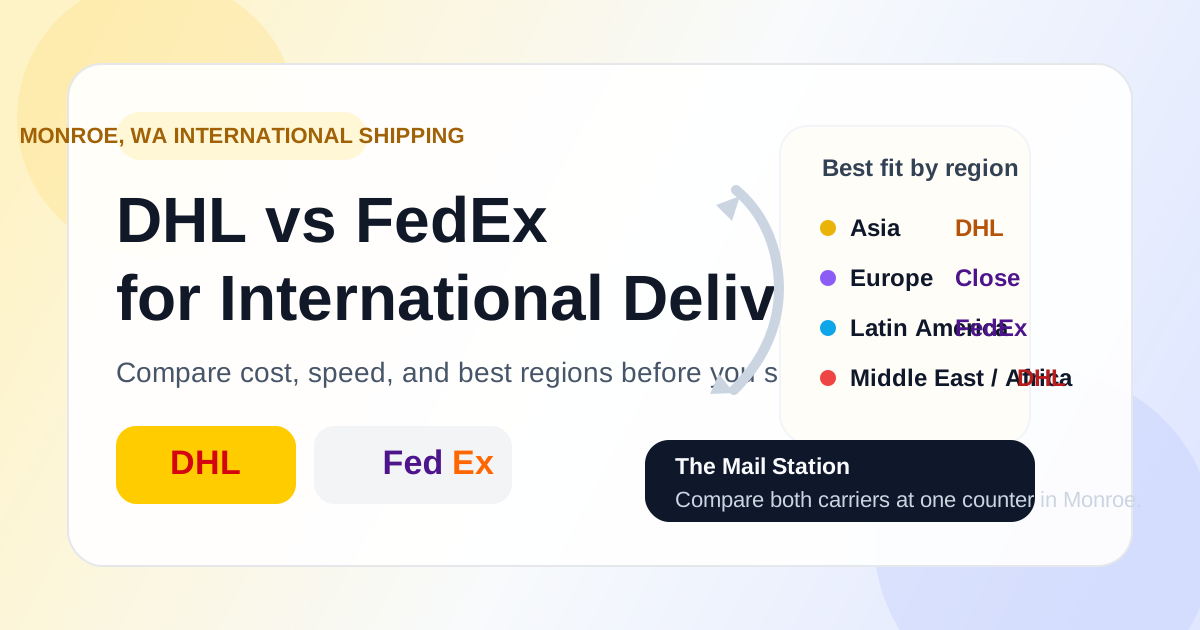
DHL vs FedEx International Shipping: Which Is Faster?
DHL is usually faster to Asia, the Middle East, and Africa; FedEx often wins to Europe and Latin America. Compare both carriers in one stop in Monroe, WA.